
 Ultimate Edition
Kontakt Gospel Sound Pack
“Every Sound in Gospel You Need!”
Experience more than 40 GB of gospel-focused pianos, electric pianos, pads, strings, bells, choirs, synth brass and performance layers—all running inside the redesigned four-part Wise Engine.
Requires Kontakt Full 6.7.1 or newer, including Kontakt 7 or Kontakt 8 Full. It does not work in the free Kontakt Player.
Complete Gospel Sound Collection
One Library. Decades of Church Sounds.
Go from expressive acoustic grands to classic digital pianos, warm worship pads, layered splits and synth textures without leaving the Wise Engine.
Built for the Working Church Musician
Kontakt Gospel Sound Pack brings together the sound families church keyboard players reach for week after week. Load single tones, build four-part combinations, recall curated performance-ready snapshots or create larger setups using Kontakt Multis.
- Expressive acoustic, digital and stage-piano tones
- Electric pianos from warm reeds to bright digital layers
- Pads, strings, bells, choirs, brass and synth leads
- Worship, shout, split, stacked and single-sound snapshots
- Selective loading to conserve system memory
Sound Families
A broad keyboard palette for traditional gospel, contemporary worship, praise, shout and studio work.
The New Flagship KGSP Experience
Ultimate Replaces Pro
The sound library you know from Pro remains intact. Ultimate focuses on a faster, cleaner Kontakt workflow with a completely redesigned interface, new performance controls and an integrated Loop Player.
Same Sounds. A Better Way to Play Them.
Ultimate is not a replacement sound collection. It carries forward the Pro Edition sound lineup while cleaning out lower-quality or less-useful snapshots so the preset browser is more focused.
- All four Parts are now available through easy-access buttons
- New per-Part Mute and Solo controls
- Master FX consolidated at the bottom of the interface
- Part FX moved to a dedicated easy-access button
- No new sounds required to learn or re-audition
Completely Redesigned Interface
No more Part tabs along the bottom. Jump directly to any of the four Parts, reach Part FX faster and keep Master FX together in one consistent location.
All-New Performance View
See all four Parts in one view and control each Part's volume, Mute and Solo without moving through separate editing pages.
All-New Loop Player
Play Wise Sound loops ported from Pocket Gospel Sound Pack for iOS directly inside Kontakt, complete with dedicated transport controls.

See Ultimate in Action
Meet the Ultimate Edition
See the redesigned Kontakt interface, the new Performance View, per-Part Mute and Solo controls, and the integrated Loop Player in action.
Watch Ultimate Edition Video ▶A Major KGSP Advantage
One-Click Delivery Through Pulse
KGSP is delivered through the dedicated Pulse application—giving you an easier way to install, manage, update and re-download your library.
Your Library. Installed the Right Way.
A 40 GB library should not arrive as a fragile, temporary browser link. Pulse gives KGSP customers a dedicated application for redeeming, downloading, installing and managing the library.
Supercharged Downloads
Pulse distributes large libraries through a global content-delivery network.
Verified Files
Download validation confirms that the files are intact before installation is marked complete.
Pause and Resume
Continue a large transfer later instead of restarting the complete download.
Permanent Access
Sign back into Pulse and reinstall your redeemed KGSP product when needed.
Product Updates
Available library updates can be delivered and managed through the same application.
Cross-Platform App
Pulse provides applications for macOS, Windows and Linux.
From Purchase to Playing in Four Steps
Choose the Standard or Ultimate Edition.
Download Pulse and sign into your account.
Select Add a Product and enter the supplied key.
Select your preferred drive and begin installation.
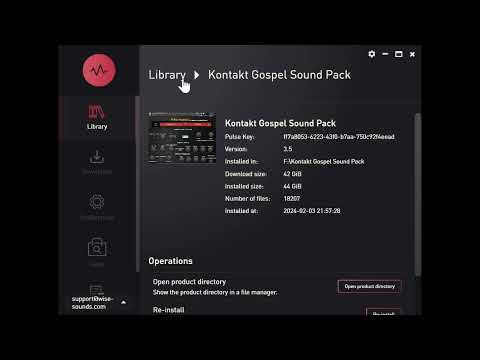
Wise Sound Walkthrough
Download Wise Sound Libraries with One Click
Watch the process for adding a Wise Sound Kontakt library to Pulse, redeeming the supplied key and beginning installation.
Play Pulse Tutorial ▶Hear the Library
In the Hands of Church Musicians
Hear KGSP used in full playthroughs, reviews, performances and detailed library demonstrations.

Start Here
Kontakt Gospel Sound Pack Overview
See the library, interface, sound selection and overall Wise Engine workflow.
Play Overview ▶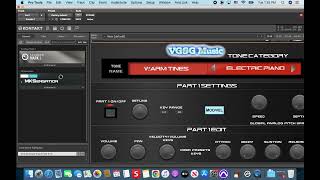
Full Playthrough
Maestro Jayden Arnold
A direct-audio playthrough of KGSP version 3.5.

Legacy Pro Sound Review
Brandon Forte
A detailed musician review of the former Pro sound library, now carried forward into Ultimate.

Musical Performance
“Don’t Cry” Performance
Hear the library used in a complete musical setting.

Library Update
Version 3.5 Walkthrough
A closer look at the musician-focused update.

Musician Demo
Sky Stallings
A musician explores the KGSP sound collection.

Additional Performance
Jayden Arnold B-Roll
More performance footage featuring KGSP sounds.
Choose Your Edition
Standard or Ultimate
Standard preserves the established version 3.5 experience. Ultimate replaces Pro as the flagship edition, keeps the Pro sound collection and adds the redesigned interface, Performance View, Loop Player and new live controls.
Standard Edition
The final version 3.5 Standard Edition with the established sound selection and original Wise Engine workflow.
- Original version 3.5 sound lineup
- Four-part Wise Engine
- More than 100 snapshot presets
- Global and per-part effects
- Pulse delivery and management
Ultimate Edition
Ultimate replaces Pro. It keeps the same Pro sound collection while completely redesigning how you access, mix and perform with the four Parts.
- Same sound collection as the former Pro Edition
- Completely redesigned four-Part interface
- All four Parts available through easy-access buttons
- New per-Part Mute and Solo controls
- All-new Performance View with volume, Mute and Solo
- All-new Loop Player with transport controls
- Consolidated Master FX and faster Part FX access
- Lower-quality and less-useful presets cleaned out
- Pulse delivery and management
Ultimate Sound Collection
Ultimate carries forward the same revised sound lineup used by Pro. No new sounds were added for the Ultimate release; the changes are focused on interface, workflow, performance control and preset cleanup.
| Standard Sound | Ultimate Sound | |
|---|---|---|
| U110 Piano | → | Classic Grand (PC88) |
| Gospel Grand V2 Version 2.2 remains included | → | Gospel Grand ES |
| S700 Grand V1 S700 Grand V2 remains included | → | 9FT Unibody MK2 |
| Austrian Grand | → | PCM CP80 |
| MKS Piano 1 V1 MKS Piano 1 V2 remains included | → | German Upright |
| MKS Piano 3 Dry | → | C7 Grand |
| 76 Tine | → | Mark V EP |
| Yama’s EP 2 | → | DX Layer |
| Warm Reed EP | → | R&B Soft |
| Silver String | → | Ens Mix |
| Worship Pad | → | VP Soft |
| Munchkins | → | Munchkins V2 |
Redesigned for Ultimate
The Wise Engine
The same four-Part Kontakt architecture is still at the center of KGSP, but Ultimate reorganizes the interface around faster access and live performance.
Four Parts. No Part Tabs.
Choose a sound for each Part, define its playing range, shape its response and process it independently—now with all four Parts available from easy-access buttons. Empty Parts still load no samples, helping conserve system memory.
Four-Part Layering
Stack sounds or assign key ranges to create splits and performance zones.
Instant Part Access
All four Part buttons are always within easy reach—no bottom Part tabs to move through.
Per-Part Mute & Solo
Mute or solo individual Parts directly for faster sound building and live control.
Performance View
See all four Parts together and control volume, Mute and Solo from one performance-focused screen.
Per-Part Shaping
Adjust detune, key range, volume, pan, velocity and ADSR settings for each Part.
Easy-Access Part FX
Open a Part's dedicated effects from a direct Part FX button instead of hunting through the interface.
Consolidated Master FX
Master effects are grouped at the bottom of the interface for a cleaner, more consistent workflow.
Loop Player
Play Wise Sound loops ported from Pocket Gospel Sound Pack for iOS inside Kontakt with transport controls.
Resource Management
Only selected sounds load. Empty Parts consume no sample memory.
Read Before Purchasing
Compatibility & Requirements
Confirm that you own the correct Kontakt version and have sufficient storage and memory before ordering.
This Is Not a Kontakt Player Library
KGSP requires the paid Full version of Kontakt 6.7.1 or newer. Pulse installs the library files, but it does not replace Kontakt or make KGSP compatible with the free Kontakt Player.
How to Install with Pulse
KGSP is downloaded through Pulse, then opened as a third-party instrument in Kontakt Full.
- Install Pulse and sign into your account.
- Select Add a Product and enter your redemption key.
- Choose a reliable internal or external SSD.
- Allow Pulse to download, verify and extract KGSP.
- Open Kontakt Full and browse to the installed folder.
Digital Delivery & Policy
Confirm compatibility before purchasing and review the current Wise Sound policies and license.
- Digital products are non-refundable
- Delivery is handled through Pulse
- Redeemed products remain available in Pulse
- Commercial musical use is permitted under the EULA
What happened to the Pro Edition?
Ultimate Edition replaces Pro as KGSP's flagship edition. Ultimate keeps the same Pro sound collection, adds the redesigned interface, Performance View and Loop Player, and removes lower-quality or less-useful presets.
Does KGSP work in the free Kontakt Player?
No. It requires the paid Full version of Kontakt 6.7.1 or newer.
Is Pulse required to download KGSP?
KGSP uses Pulse for managed delivery. Install Pulse, redeem your supplied key and choose the installation location.
Can I re-download KGSP after changing computers?
Your redeemed product remains associated with your Pulse account and can be installed again.
Should I add KGSP through Native Access?
No. KGSP is delivered through Pulse and opened through Kontakt Full’s file or Quick-Load browser.
Can I use KGSP on an Apple silicon Mac?
Your system must be supported by the Full version of Kontakt you install. Pulse also provides a macOS application.
Can KGSP be used in commercial music?
Yes. Finished musical works and performances are permitted under the Wise Sound EULA.
Raw samples and library files may not be redistributed or used to create another sample library.
Choose Your Library
Bring the Wise Engine to Kontakt
Choose Standard for the established version 3.5 experience or Ultimate for the redesigned flagship workflow. Both editions include managed Pulse delivery. Kontakt Full 6.7.1 or newer is required.
Digital download delivered through Pulse. All sales are subject to the current Wise Sound Terms & Conditions and End User License Agreement.